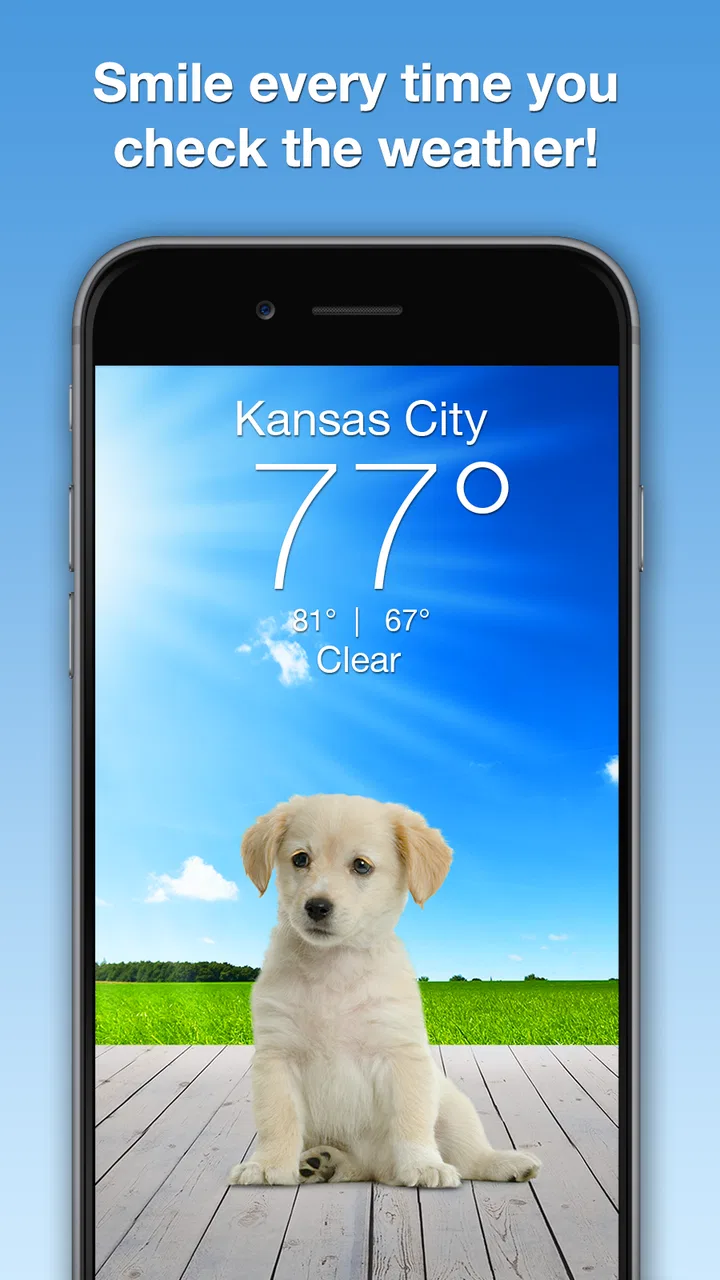
Weather Puppy - App & Widget
- 4.9
- Rating
- 1.00M
- Installs
- Free
- Price

 Analysis by App-foxy
Checking the weather can feel like a small chore, especially when a forecast app opens with dense charts, warnings, and layers of information. Weather Puppy takes a different route. It is a free weather app from Weather Creative Inc. that puts dogs at the center of the experience, so the forecast feels lighter and more pleasant to glance at. I found that personality is its biggest strength, but it also creates the main question: do you want a cheerful way to check conditions, or a highly technical weather tool?
After using it as an everyday forecast companion, I see it as a good fit for people who want quick local information without turning every check into a data-reading session. The dog-focused presentation makes it especially approachable for families, casual users, and anyone who enjoys a little visual charm in a routine app. At the same time, users who plan outdoor work, travel around changing weather systems, or need advanced meteorological detail may still prefer a more conventional alternative.
Getting past the first points of friction
The first place people can get stuck is expecting the app to behave like a full professional weather dashboard. Its store summary makes the playful idea clear: dogs help present the local forecast. That framing matters. I would approach it as a friendly glanceable tool rather than a replacement for every specialist weather service.
You May Also Like

 Blood Strike: 2.5 Anniversary
Blood Strike’s Loadouts Turn Every Drop Into a Tactical Gamble
A close look at Blood Strike’s custom loadouts: how fast access to signature weapons reshapes its battle royale rhythm, rewards preparation, and narrows the gap between fights.

 Pandora - Music & Podcasts
Pandora’s Music Is Easy to Start, but Harder to Recover
Pandora’s strength is its low-effort path from a seed to a station. Its weak spot is how much confidence it asks you to place in connection, setup, and quiet recovery.

 8 Ball Pool
 Is Built on Rivalries, Rematches, and Routine
A close look at the rivalries, rematches, shared routines, and unanswered safety questions that turn a quick pool match into a persistent mobile community.

 Samsung Music
’s Quiet Strength Is Playing What You Already Own
Its reach comes less from spectacle than from dependable access to a personal library. That simplicity is both the app’s strongest retention engine and its ceiling.

 AccuWeather: Weather Radar
AccuWeather Review: A Quick, Clear Forecast for Everyday Decisions
For everyday plans, the best forecast is the one you can understand quickly. AccuWeather makes rain timing, radar, and local conditions easy to act on, with a few trade-offs.

 Hill Climb Racing
Why Hill Climb Racing Still Turns Crashes Into One More Run
A tiny car, a bumpy hill and one more upgrade: Hill Climb Racing keeps resurfacing because its simple chaos makes every near-miss feel personal.
More From Our News Desk



Another common source of confusion is location setup. A weather app needs to know which place you want to follow, and the useful result depends on that location being correct. If the forecast seems wrong, I would first check whether the displayed city or area matches where I actually am. This is a more productive first step than immediately assuming the forecast engine is broken.
The app is rated for Teen users, so it is not positioned as a preschool-only product despite the dogs. That makes sense in practice: the visual style is friendly, but the app still serves a general audience checking real weather information. I could see a parent letting an older child use it to build the habit of checking conditions before school or an activity, while younger children may need help interpreting what the forecast means.
On compatible devices, the app supports an operating system beginning with version 7.0, which gives it a broad compatibility range. Still, compatibility is not the same as a perfect experience on every phone. Older hardware, aggressive battery management, or outdated system components can affect loading and background behavior. If the app feels slow, I would check the device and system first rather than judging the weather content immediately.
What to check before blaming the forecast
My preferred setup routine is simple. I open the app while connected to a reliable network, confirm the location shown on screen, and give the forecast a moment to load before switching between screens or closing it. If I am setting it up for someone else, I also make sure the person knows which location is being followed. A surprising number of “wrong forecast” complaints are actually location-selection mistakes.
If a widget is involved, I treat it as a separate display that may need refreshing. A widget can show an older snapshot when the phone has restricted background activity, when the network has changed, or when the system has not refreshed it yet. In that situation, opening the main app is a sensible check. If the full app shows current information but the widget does not, the problem is likely with the home-screen update rather than the forecast itself.
I would also avoid testing the app during a moment when the phone is switching between Wi-Fi and mobile data. A brief connection change can make a forecast appear incomplete or delayed. Waiting for the connection to settle, then reopening the app, is often less frustrating than repeatedly tapping refresh.
The latest listed version is 6.1.8. Keeping the app current is a practical setup step because updates can address compatibility issues, loading behavior, or presentation problems. I would not assume an update will transform the app into a different kind of weather service, though. Its core appeal remains the combination of local forecast access and dog-themed presentation.
A useful everyday workflow
My normal workflow is to check the app at the moment I am deciding what to wear or whether to change a plan. For example, before leaving for work, I can look at the local conditions, decide whether a light jacket makes sense, and then check again before heading home if the day looks unsettled. The dog imagery makes those quick checks feel less clinical, which is a small benefit but one I noticed over repeated use.
For a family, the app can become a simple conversation starter. A child might notice the dog first, while an adult explains whether the day calls for outdoor play, a walk, or a backup indoor plan. The important limitation is that the cheerful presentation should not replace reading the actual forecast information. A cute visual cue is helpful for engagement, not a substitute for understanding rain, temperature, or changing conditions.
I also found it useful to separate “quick glance” decisions from “high-consequence” decisions. If I am deciding whether to take an umbrella to a nearby shop, the app is well suited to the moment. If I am planning a long hike, a flight connection, a boat trip, or work that depends heavily on weather, I would compare it with a service offering more specialized warnings and detail. That is not a failure; it is a matter of choosing the right level of information.
Recovering when the routine breaks
When the forecast does not appear correctly, I would use a calm recovery sequence rather than reinstalling immediately. First, I would confirm the selected location and the internet connection. Next, I would close and reopen the app, then check whether the same issue appears in the main view and any widget separately. This helps identify whether the trouble is with the app display, the home screen, or the connection.
If the app opens but seems stuck, I would restart the phone before taking more drastic steps. A restart can clear a temporary system process that is interfering with loading. I would also check whether the device has very little free storage or whether its system is applying a restrictive battery mode. Those conditions can affect many apps, including weather tools, and are not necessarily caused by Weather Puppy itself.
Reinstalling should be a later step, not the first one. It can remove local settings and force you to configure the app again, so I would only consider it after checking the location, connection, system state, and current app version. If the problem affects only a widget, removing and adding that widget again may be more targeted than removing the whole application.
There is also a difference between stale information and an inaccurate forecast. Weather changes, and local conditions can vary across a short distance. If the app shows a location that is nearby but not identical to where I am, the result may reasonably differ from what I see outside. Checking the selected place and comparing the timing of the forecast update gives a better diagnosis than judging it from one observation.
When the phone or network is the real problem
Weather apps depend on services outside the screen in front of me. A weak connection, a temporary service interruption, or a phone setting that limits background activity can all make an otherwise functional app appear unreliable. The most useful test is comparison: if other network-dependent apps are also slow, I look at the connection first. If only the widget is delayed while the main app works, I focus on the widget and system refresh behavior.
Location accuracy can create another misleading result. Indoor positioning, a recently changed location, or a manually selected city can all lead to a forecast that feels “wrong” even though it matches the place the app is using. I prefer manually confirming the displayed area before changing any other settings. This is especially important when traveling, because an app may continue showing a familiar home location until it is updated.
Battery-saving features deserve attention as well. Some phones limit background updates to preserve power, and that can make a home-screen forecast look older than the information available after opening the app. If timely widget updates matter to me, I would review the phone’s battery and background restrictions. I would not disable every power-saving feature blindly; I would make a targeted change only if the widget’s freshness is important enough to justify it.
Notifications and visual behavior can also be affected by the operating system. If the app is installed but does not behave as expected on the home screen, I would check the phone’s app settings and widget availability before assuming the application itself is defective. Menus vary by device, so the safest general advice is to look for the app’s system settings rather than follow a device-specific path that may not match the phone.
How it compares with ordinary weather apps
Most standard weather apps compete through information density. They often emphasize radar views, detailed hourly breakdowns, severe-weather notices, maps, and numerous customization controls. Weather Puppy competes through approachability. The dog theme gives it an emotional hook and makes the act of checking the forecast feel more personal.
That difference affects who will enjoy it. I would recommend it to someone who opens a technical weather app, feels overwhelmed, and only wants the essentials for daily decisions. I would also recommend it to users who like expressive widgets and want their home screen to feel less sterile. The visual identity is not decoration added to an otherwise generic review; it is the reason to choose this app over a plain forecast utility.
On the other hand, I would steer a dedicated weather enthusiast toward a more data-heavy option. If I need to study storm movement, compare several locations in detail, or make decisions where precise warnings matter, I want tools designed around that job. The playful design may make routine checks more enjoyable, but it does not automatically provide the depth of a specialist service.
The free price makes trying it low-risk. There are in-app purchases ranging from $0.99 to $49.99 per item, so I would pay attention to the purchase screen and decide whether any optional extras are worthwhile for my own use. The free entry point is enough to evaluate the basic experience before spending anything. I would not buy an add-on simply because the dog presentation is charming; I would first decide whether it solves a specific problem in my routine.
Who will get the most from it
The strongest audience is the casual weather checker who values clarity and personality. If I want to know whether I should carry an umbrella, wear warmer clothes, or adjust a short outing, the app fits naturally into that routine. It is also a good choice for someone who finds conventional weather interfaces too serious or cluttered.
It can work well in a shared household, too. A parent can use the friendly visuals to encourage a child to look at the forecast before leaving home, while the adult remains responsible for interpreting important conditions. The app’s Teen age rating means I would treat it as a general-audience product with a playful style, not as a dedicated early-childhood learning tool.
People who enjoy personalizing their phones may appreciate the widget-oriented experience. A weather widget is most valuable when it reduces the number of steps needed to check conditions, and a dog-themed one adds a little character while doing that. The trade-off is that widget reliability depends partly on the phone’s own refresh rules, so users expecting minute-by-minute updating should keep those system limitations in mind.
I would skip it if my priority is advanced weather analysis, extensive location comparison, or specialized alerts. I would also skip it if I dislike themed interfaces and want every screen optimized for maximum numerical detail. In those cases, a conventional weather service will probably feel faster and more purposeful, even if it is less fun to look at.
My practical verdict
Weather Puppy succeeds because it understands that many people do not need a weather laboratory; they need a pleasant answer to a small daily question. The dogs give the app a distinct identity, and the free starting point makes it easy to see whether that style fits my habits. Its strong user response is reflected in an average rating of 4.9 from around 32 thousand ratings, while more than 500 thousand installs show that the concept has reached a substantial audience.
My recommendation comes with a clear boundary. Use it as a friendly local forecast companion, especially for quick decisions and a more cheerful home screen. Keep your setup simple, confirm the location, check the main app when a widget looks stale, and investigate network or battery restrictions before reinstalling. Those steps address the most likely friction without turning a small weather check into a technical project.
Weather Creative Inc. has made a weather app that is easier to remember than the average forecast utility. I would install it for everyday convenience, family use, and visual personality. I would pair it with a more detailed source for serious travel, outdoor planning, or hazardous conditions. The best reason to choose Weather Puppy is not that it replaces every weather tool, but that it makes ordinary forecast checks easier to start and nicer to repeat.
FAQs for Weather Puppy - App & Widget
01What is Weather Puppy and how does it work?
Weather Puppy is a weather application that provides users with up-to-date weather forecasts while featuring adorable puppy images. It delivers current conditions, hourly and 10-day forecasts. The app combines weather data with delightful visuals, making checking the weather more enjoyable. It also includes widgets for quick access to information.
02Does Weather Puppy offer any customization options?
Yes, Weather Puppy offers several customization options. Users can choose from different puppy themes and set their preferred locations for weather updates. The app allows customization of units for temperature and wind speed. You can personalize the widget display on your home screen to suit your preferences.
03Is Weather Puppy free to use, and are there in-app purchases?
Weather Puppy is free to download and use. However, it offers in-app purchases to remove ads and unlock additional puppy themes. The free version includes essential weather information, but the premium version enhances the experience with more features and an ad-free interface.
04How accurate is the weather data provided by Weather Puppy?
Weather Puppy sources its data from reliable weather providers, ensuring accuracy in forecasts. The app uses advanced algorithms to deliver precise and timely weather updates. While no weather app can guarantee 100% accuracy, Weather Puppy strives to offer reliable information for planning your day.
05Can I use Weather Puppy without an internet connection?
Weather Puppy requires an internet connection to update weather data. While the app can display previously downloaded information, a connection is necessary for real-time updates. For the best experience, ensure that your device is connected to Wi-Fi or mobile data when using the app.
Pros
- Adorable dog themes enhance user experience.
- Accurate weather forecasts with detailed info.
- Customizable widgets for quick access.
- Easy navigation with user-friendly interface.
- Frequent updates keep data reliable.
Cons
- Limited theme options without purchase.
- Ads can be intrusive at times.
- Requires internet for full functionality.
- Battery usage slightly higher with widgets.
- In-app purchases for premium features.

Weather Puppy - App & Widget
Gallery